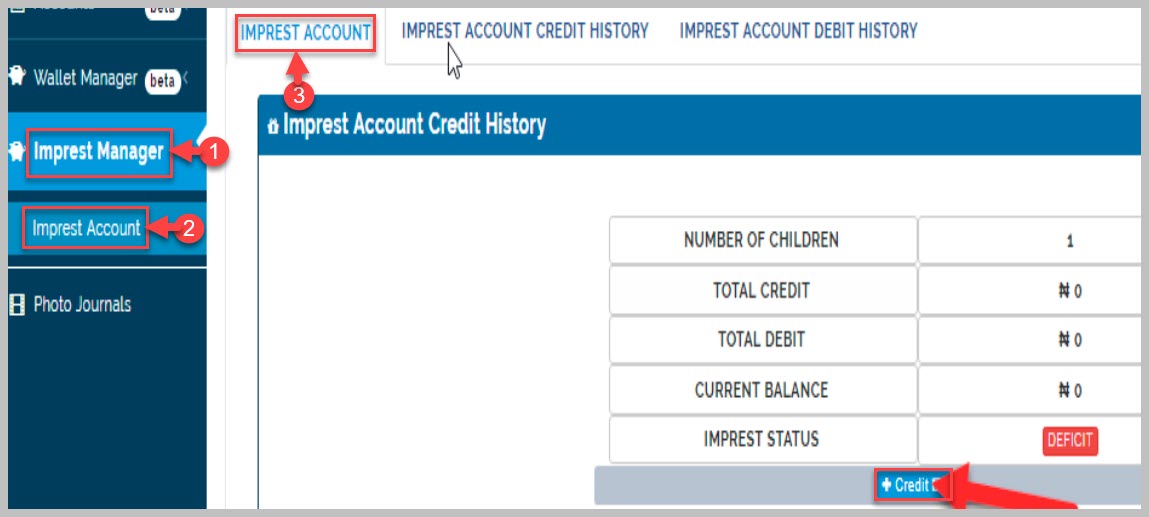
This gives parents record of their total credit and debit status in imprest account
Imprest account displays the number of children the parent has in the school. It gives details of total credit/debit history of every child a parent has in the school. The Imprest status of every parent is also displayed. This is an indicator of whether the parent has credit available for their child/children to use in making purchase from the school store.
How to Add credit to Imprest Account (As a Parent)
To credit imprest account, follow these steps;
-
Navigate to Imprest Account, this displays Imprest Status of the parent
-
Click on Credit button
-
Select preferred payment channel
-
Enter desired amount you wish to pay into Imprest account
-
Follow the prompts to complete the transaction