
This is where the Admin manages lives schedules and contents sent by teachers for publishing
Teachers create Live classroom schedules for publishing learning materials of various subjects like lesson notes, lesson videos etc. Teachers also create live classroom schedules to host online interactive classes with their students
How to View Live Schedule
To view Live schedule follow these steps;
-
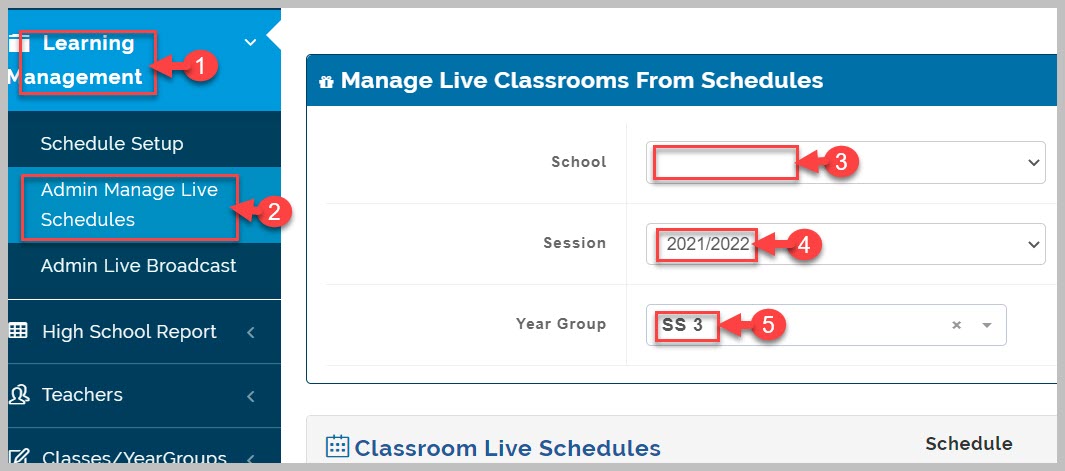
Go to Learning Management
-
Select Admin Manage Live Schedules from drop-down menu
-
Select school category, academic session, and Level(Year Group) of interest
-
Search for Live schedule of interest using parameters like subject, date created, teacher's name etc.
-
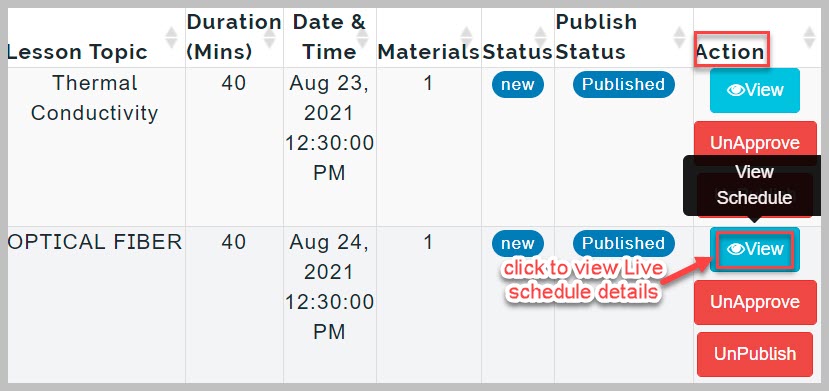
Navigate to actions column and click on View button to view Live Class Schedule
How to Approve and Publish Live schedule
To Approve and Publish Live schedules, follow these steps;
-
From step 5 above, click on Approve button to approve live schedule, this activates Publish button
-
Click on Publish button to complete action

Manage Live Schedule Notes
To unpublish live schedule, click on UnPublish button
To disapprove/reject a live schedule, click on Unapprove button